
10 QuickBooks Mistakes to Avoid
QuickBooks Online is a powerful tool. It gives you flexibility, automation, and access to real-time financial data. But that same flexibility can also create issues if the system isn't set up and managed intentionally.
By this point in the year, you're likely deep into your accounting workflow. Even experienced users can fall into habits that slowly create clutter, confusion, or inaccurate reporting. Most bookkeeping mistakes don't happen because someone doesn't care. They happen because small shortcuts compound over time.
If your goal is clean, compliant financials and reliable reporting, it’s worth stepping back and evaluating a few common problem areas.
Mistake #1: Deleting Personal Transactions
If business and personal transactions are flowing through the same bank account, it can be tempting to simply delete the personal ones from QuickBooks Online. That feels cleaner in the moment, but it creates reconciliation issues and gaps in your records since those transactions still appear on your bank statements.
Instead of deleting them, categorize personal transactions properly. They should typically be recorded as Owner's Draw or Owner's Contribution under Owner's Equity. That keeps your books aligned with your actual bank activity and protects you during tax preparation.
The long-term solution is separate accounts for business and personal activity. Yes, there may be additional fees. It is still worth it. Clean separation makes everything easier — bookkeeping, reporting, and compliance.
Mistake #2: Creating Too Many Categories
QuickBooks Online allows you to customize your Chart of Accounts. That flexibility is helpful, but over-customizing often creates reporting confusion.
We frequently see overlapping categories like “Office Supplies” and “Miscellaneous Supplies” or multiple small variations of the same expense. Over time, this fragments your data and makes financial reports less useful.
A streamlined, intentional Chart of Accounts produces clearer reporting. If categories feel redundant, unclear, or overly detailed, it may be time to consolidate or rename them. The goal is clarity, not complexity.
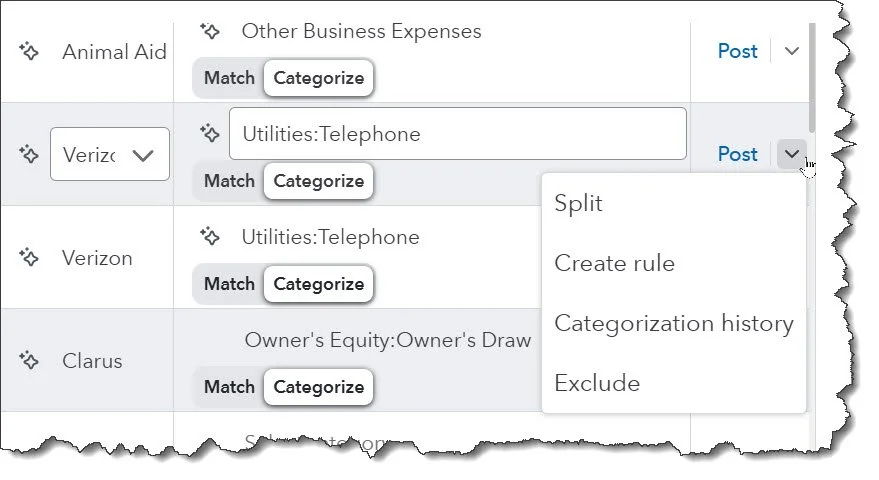
A clean Chart of Accounts supports accurate reporting. While the default structure in QuickBooks Online works well for most businesses, there are times when thoughtful adjustments make sense. The key is being intentional. Changes should improve clarity — not create more fragmentation.
Mistake #3: Ignoring Undeposited Funds
The Undeposited Funds account (sometimes labeled Payments to Deposit) exists for a reason. It holds customer payments temporarily until they are grouped into a single bank deposit that matches what actually hits your account.
If this account isn't reviewed regularly, deposits can be duplicated or recorded incorrectly. That throws off your bank reconciliation and distorts your income reporting.
This account should not quietly grow in the background. It needs consistent oversight so your deposits match your real-world bank activity.
Mistake #4: Misclassifying Transactions
Accurate categorization is the foundation of reliable financial statements. When transactions are misclassified, your reports lose integrity.
A common example is loan payments. The principal portion reduces a liability. Only the interest portion is an expense. If the entire payment is recorded as an expense, your profit and loss statement becomes inaccurate and your balance sheet no longer reflects reality.
Small misclassifications add up. Over time, they affect tax reporting, cash flow analysis, and business decisions.
Mistake #5: Letting Open Invoices and Bills Sit
Unpaid invoices and overdue bills are not just administrative tasks — they directly impact your understanding of cash flow.
If receivables are not followed up on or payables are left unresolved, you lose visibility into what is truly collectible and what obligations are upcoming. That makes it difficult to plan with confidence.
Clean accounts receivable and accounts payable processes are essential for meaningful financial insight.
Mistake #6: Failing to Document Purchases
Entering and categorizing a transaction is only part of the job. Documentation matters — especially for large or unusual purchases.
Without notes or attachments, it becomes difficult months later to remember what was purchased and why. That creates stress during tax preparation and unnecessary risk in the event of an audit.
QuickBooks Online allows you to attach receipts and add transaction notes. Using those tools consistently protects you and strengthens your records.
Mistake #7: Setting Up Overly Broad Rules
Bank rules can save significant time. When used correctly, they streamline repetitive categorization.
However, poorly defined rules can misclassify transactions automatically and create widespread cleanup work later. Rules should be specific, tested carefully, and reviewed periodically to ensure they're working as intended.
Automation is powerful. Oversight is still required.
Mistake #8: Skipping or Rushing Reconciliations
Reconciliation is not optional. It is the control that confirms your books match your bank and credit card activity.
Done correctly, reconciliation builds confidence in your numbers. Done incorrectly, it can create more confusion than clarity.
This process requires attention to detail and consistency. If it feels overwhelming, that's often a sign it needs a stronger system or dedicated oversight.
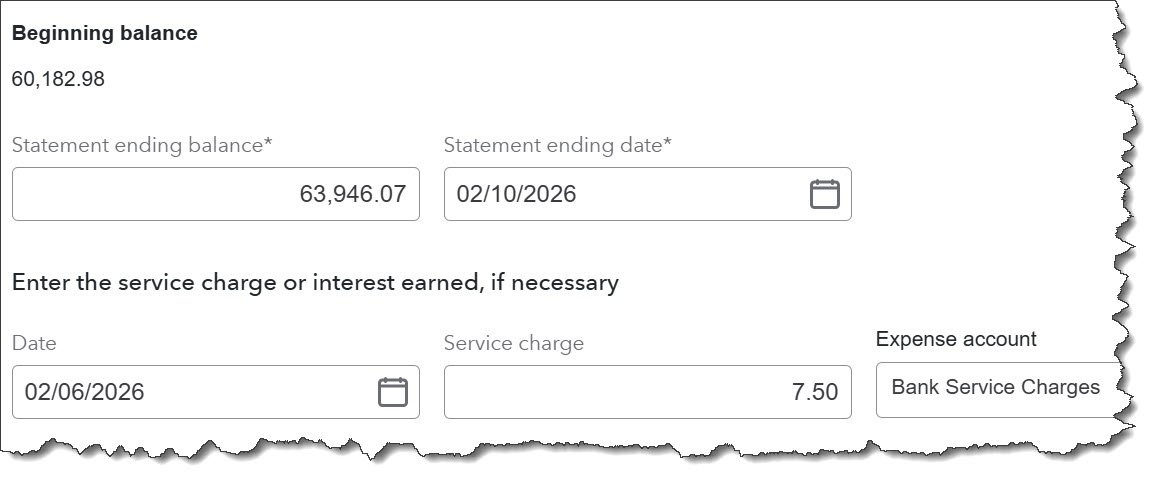
Reconciling incorrectly can create more problems than skipping it altogether. When accounts are forced to balance without fully understanding discrepancies, errors get buried instead of resolved. That undermines the reliability of every report you review afterward.
Accuracy builds confidence. Guesswork erodes it.
Mistake #9: Not Leveraging Classes and Locations
QuickBooks Online includes tools that many businesses never fully use. Classes and Locations allow you to segment your financial data more meaningfully.
Classes can help track profitability by service line, department, or revenue stream. Locations can separate performance by office, region, or store. When used intentionally, these tools give you clearer insight into which areas of your business are driving results — and which may need attention.
They are not necessary for every business. But for growing companies, reporting and decision-making can be significantly improved.
Mistake #10: Using the Wrong QuickBooks Online Version
Not all versions of QuickBooks Online are built the same. As your business grows, your reporting, user access, inventory, or project tracking needs may change.
If your current subscription limits visibility or efficiency, it may no longer be the right fit. Software should support your growth — not restrict it.
Stepping Back
Bookkeeping has a lot of moving parts. Mistakes are rarely dramatic. They're usually small decisions repeated over time.
The goal isn't perfection. It's clarity.
When your books are accurate and structured intentionally, you can rely on your numbers to make informed decisions. If you're unsure whether your QuickBooks setup supports that goal, it's worth reviewing it before small issues turn into larger cleanup projects.
Clean books are not just about compliance. They are about confidence in the direction of your business.